


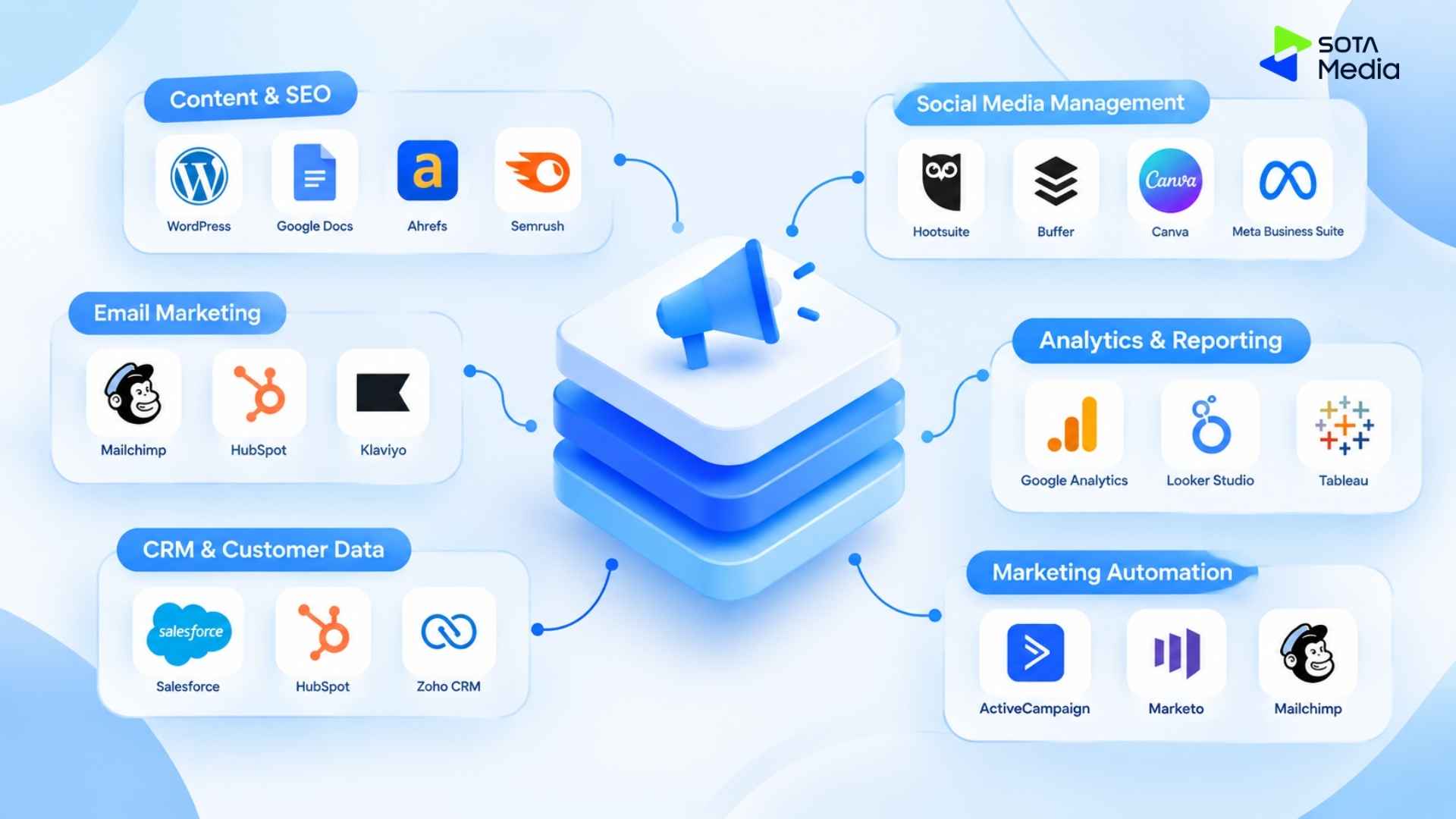

Omnichannel Digital Marketing
Marketing teams are using more tools, but more tools do not always mean better performance. Only 31% of marketers are fully satisfied with their ability to unify customer data sources.
When CRM, analytics, email, advertising, and other systems work separately, data becomes fragmented, and workflows become harder to manage. A well-designed MarTech stack should connect these systems around your marketing process and customer journey.
In this post, Sotamedia will introduce how to build a marketing tech stack step by step.
Key Takeaways
- A marketing tech stack is a collection of tools that help businesses attract, convert, and retain customers while keeping customer data connected across marketing, sales, and analytics systems.
- Building an effective MarTech stack involves eight key steps: define your marketing process, map the customer journey, identify required functions, choose tools, connect data, set up tracking and automation, test the funnel, and regularly audit the stack.
- Common mistakes include choosing tools before defining business goals, creating disconnected systems, using too many overlapping tools, and ignoring scalability and data governance.
What is a marketing tech stack?
A marketing tech stack is a combination of software to execute, manage, and analyze marketing activities in order to increase productivity and avoid data silos (fragmented data).
For example, a marketing tech stack in a start-up business can include:
- HubSpot CRM: to manage leads, track customer interactions, and organize the sales pipeline.
- Google Analytics 4: to track website traffic, user behavior, and conversions.
- Ahrefs: to conduct keyword research, analyze competitors, and monitor SEO performance.
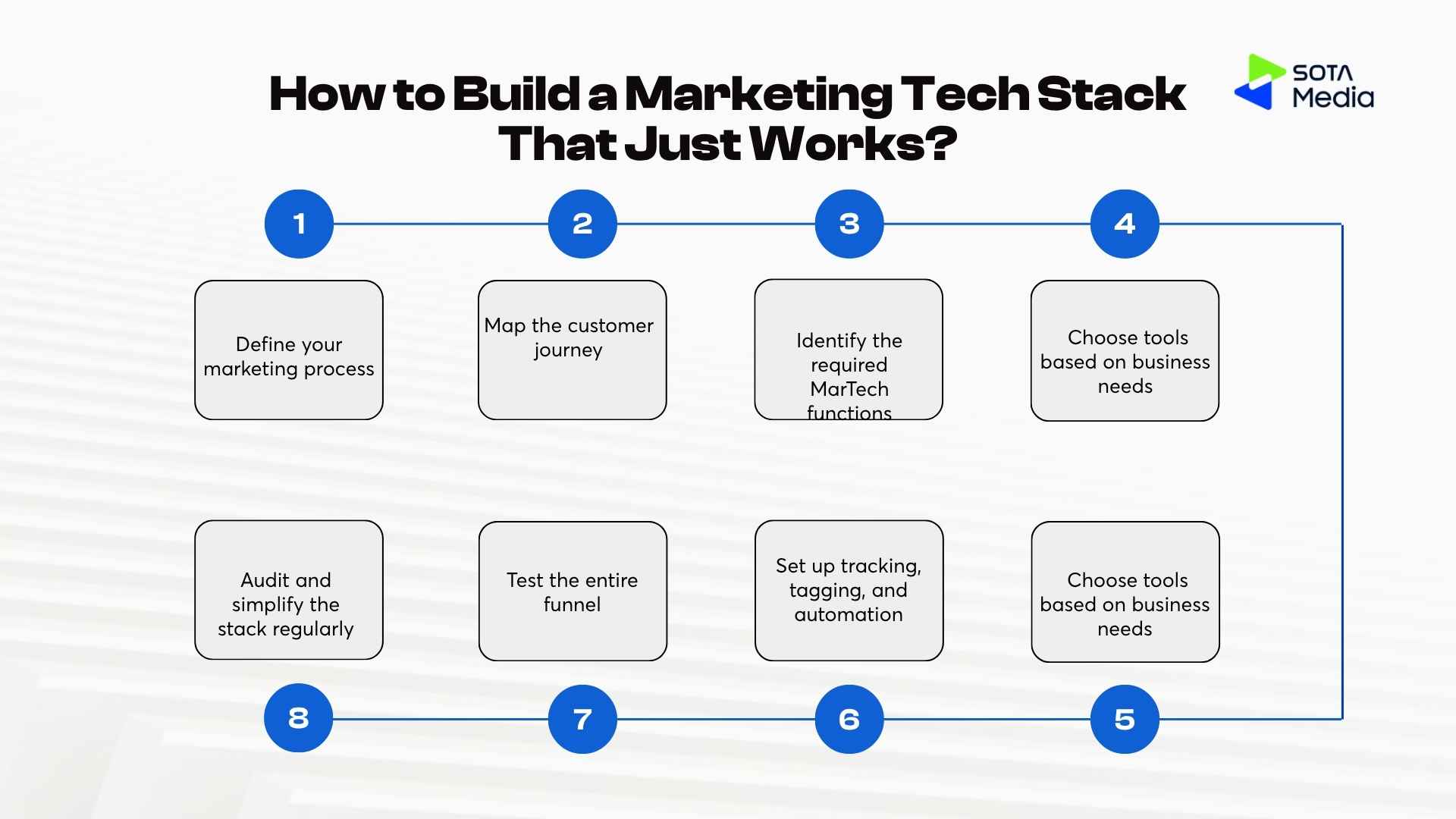
8 steps to build a marketing tech stack
Step 1: Define your marketing process
Marketing tech stack should serve your business processes. Therefore, you should:
- Define your current marketing activities from attracting traffic, capturing leads, nurturing, conversion, to retention.
- Clearly note what the team is doing, which tool to use, and where data is created
- Define main goals of the stack, such as generating leads, increasing conversion, or reducing manual work.
After understanding what you need, you can choose software to buy. This helps you avoid wasting money on unnecessary tools with overlapping functions.
Step 2: Map the customer journey
Map how customers move from awareness to purchase and continued product use. At each stage, you should define
- What do customers want to do?
- Where do they interact with your brand?
- Which factors can encourage them to move to the next stage
- Which data can be created?
For example, consider a SaaS app:
| Question | Example finding | Martech requirement |
|---|---|---|
| What do customers want to do? | Find a solution, sign up, and try the product. | Track sign-up, activation, and feature usage. |
| Where do they interact with the brand? | Google Search, website, product, and email: search for the product, explore the website, use the product, and receive emails. | Track interactions across customer touchpoints. |
| Which actions move them forward? | Complete onboarding, use key features, and request a demo. | Track conversion events and trigger lifecycle workflows. |
| What data is created? | Traffic source, contact details, company information, product usage, and email engagement. | Capture, store, and connect customer data across systems. |
Step 3: Identify the required MarTech functions
After defining the customer journey, you can identify functions to solve customers’ problems in each stage of the journey before choosing a tool.
| Function | What it does | Tool examples |
|---|---|---|
| Lead Capture | Collect information from forms, webinars, and demos. | HubSpot Forms, Typeform |
| CRM | Store and manage leads and customers. | HubSpot, Salesforce, Pipedrive |
| Email & Marketing Automation | Send emails, nurture leads, and run workflows automatically. | HubSpot, Mailchimp, Klaviyo |
| Analytics & Reporting | Follow traffic, behavior, and conversion. | GA4, Mixpanel, Looker Studio |
| SEO & Paid Media | Attract traffic from search and ads. | Semrush, Google Ads, Meta Ads |
| Customer Support / Chat | Support customers and ha | Support customers and ha |
| Data Integration | Connect and synchronize data among the systems. | Zapier, Make |
Step 4: Choose tools based on business needs
Choose tools based on actual demand instead of the number of functions. You can access it through:
- Business size and growth rate
- Team capability
- Budget.
- Required features.
- Integration capabilities.
- Reporting and scalability.
Apart from the subscription fee, you need to consider implementation, integration, training, and future scaling costs.
Prioritize tools that can integrate well with your existing system through API, native integrations, or data sync.
Step 5: Integrate tools and connect data
Once the tools are selected, connect them into a unified system.
Start by defining:
- Source of truth
- Data flow
- Triggers
- Destinations
For example:
Website Form => CRM => Email Automation => Sales Team
When a lead submits a form, the CRM automatically creates a contact record, triggers a follow-up email sequence, and notifies the sales team.
Avoid connecting every tool to every other tool. Design the data flow first, then integrate only the systems that need to exchange data to reduce complexity and prevent data silos.
Step 6: Set up tracking, tagging, and automation
Before launching campaigns, establish a consistent tracking and automation framework across your stack. By doing this, you can ensure that customer interactions are recorded accurately across analytics, CRM, and marketing platforms. In detail, you need to define UTM parameters, event tracking, lead sources, customer tags, lifecycle stages, and automated workflows.
Besides, you should create standardized naming conventions for campaigns, UTMs, events, and lead sources to keep reporting clean and reliable.
For example, name a campaign linkedin_summer_campaign and use linkedin as its UTM source and lead source, such as utm_source=linkedin for the traffic source and linkedin_lead for leads from that campaign. This keeps your tracking consistent and makes reports easier to understand.
You should also automate repetitive tasks such as lead assignment, email follow-ups, lead scoring, notifications, and reporting. Automation works best when triggers and data conditions are clearly defined.
For example, when a customer submits a form from a LinkedIn ad, the CRM can automatically record the lead source as LinkedIn, add a LinkedIn Lead tag, assign the lead to a sales representative, and send a follow-up email. If the customer later books a demo, the system can update the lead status and notify the sales team.
Step 7: Test the entire funnel
Once the marketing tech stack is configured, test the entire customer journey from end to end.
For example, a client searches for project management software by asking Google, clicking your website, and then signing up to use a demo through the website’s form. In each step, you should:
- Verify that data is captured correctly
- Leads are created in the CRM
- Tags are applied properly
- Automation workflows are triggered
- Conversions are tracked
- Dashboards display accurate information.
Regular testing helps you identify data, tracking, and automation issues before campaigns scale.
Step 8: Audit and simplify the stack regularly
Review your marketing tech stack regularly to ensure every tool still serves a clear purpose.
Identify unnecessary tools with duplicate functionality or that no longer justify their cost. Review integrations as well to determine whether they are still needed.
You can replace unnecessary tools to reduce costs, improve data quality, and make the entire system easier to manage.
Common mistakes
- Choosing tools before defining business goals: This can lead to buying unnecessary tools.
- Building a stack with disconnected tools: CRM, analytics, email, and advertising platforms may operate separately without sharing data. This creates data silos, fragments customer information, and makes it harder to build connected workflows.
- Using too many overlapping tools: This increases software costs, complexity, and time management. Therefore, you should audit the existing stack before adding new tools.
- Ignoring scalability and data governance: A marketing tech stack designed only for current needs may become difficult to manage as data volume, integrations, and automation requirements grow. Clear rules for data ownership, quality, and privacy also help keep the stack scalable.
Example marketing tech stack workflow
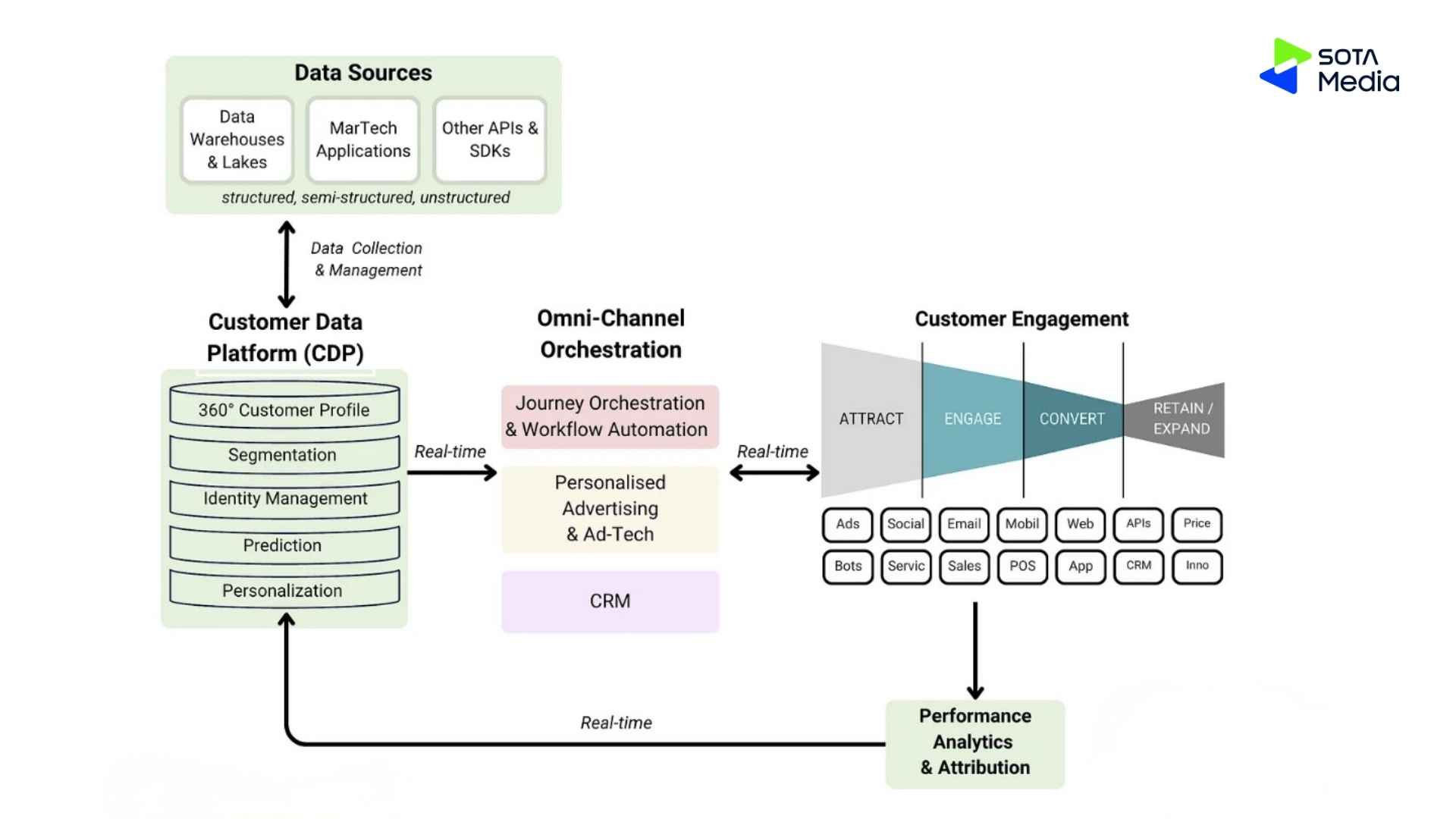
(Source: Future marketing)
For a B2B SaaS company:
| Stage | Martech tools | What happens? |
|---|---|---|
| 1. Data collection | Google Analytics 4, Hotjar, Mixpanel, Typeform | Collect visitor and user data, such as traffic sources, pages viewed, product activity, and form submissions. |
| 2. Customer profile | Salesforce, HubSpot CRM, Segment, Salesforce Data Cloud | Combine customer data from different sources to create customer profiles and identify leads, customers, and segments. |
| 3. Marketing activation | HubSpot Marketing Hub, Marketo Engage, Salesforce Account Engagement, ActiveCampaign | Use CRM data to trigger marketing actions. For example, high-intent leads can enter an email nurturing workflow or be assigned to sales. |
| 4. Customer engagement | Mailchimp, HubSpot Marketing Hub, Optimizely, Google Ads, Meta Ads | Engage customers based on their behavior. For example, users who viewed the pricing page but did not sign up can receive follow-up emails or retargeting ads. |
| 5. Measurement | Google Analytics 4, Looker Studio, Salesforce, HubSpot Analytics | Track the customer journey from lead to opportunity, customer, and revenue to measure campaign and channel performance. |
| 6. Feedback loop | Salesforce, HubSpot CRM, Segment, HubSpot Marketing Hub, Mixpanel | Feed campaign and customer data back into the system to improve customer segments, campaigns, and customer journeys. |
Conclusion
A good marketing tech stack starts with your marketing process and customer journey, not with a list of software. Define the required functions, choose tools based on business needs, connect your data, automate repetitive tasks, and audit the stack regularly.
If you want to build marketing tech stack that fits your growth goals, contact SotaMedia to plan your marketing technology and automation strategy.
Frequently asked questions
A CRM is one component of a MarTech stack. It stores and manages customer data, while a MarTech stack includes all the tools used for marketing, analytics, automation, customer engagement, and reporting.
There is no fixed number. Most startups can begin with a CRM, analytics platform, email marketing tool, and a few traffic acquisition tools. The goal is to cover essential functions without creating unnecessary complexity.
The CRM is often the foundation because it acts as the central source of customer data and connects marketing and sales activities.
Marketing automation becomes valuable when the team is spending significant time on repetitive tasks such as lead assignment, follow-up emails, lead nurturing, or reporting.
Most businesses should review their stack at least once or twice a year to identify redundant tools, unnecessary costs, integration issues, and data quality problems.
Define a clear source of truth, design the data flow before implementing tools, and integrate only the systems that need to exchange data.
Common signs include inconsistent reporting, duplicate customer records, disconnected tools, manual data transfers, poor visibility into the customer journey, and increasing software costs.