



Table of Contents
Key takeaways
- AI content automation does not replace good writing; it removes the 60% of work that isn’t writing. Research, drafting iterations, formatting, SEO optimization, image sourcing. Those are the gaps AI fills.
- The best tools in 2026 are specialized, not monolithic. One tool does research well. Another handles drafting. A third optimizes. You stack them into a workflow. The companies failing are the ones trying to use one tool for everything.
- Stacking matters more than picking. A $40/month tool in the right spot of your workflow beats a $500/month all-in-one that does everything poorly. We show you three real workflow examples.
- Automation before you document your brand voice is how you produce volume without voice. You end up with 100 blog posts that sound like nobody. Automate after you have voice locked down.
- Human review is not optional. AI can draft fast. It cannot catch when a tool makes a false claim, misunderstands your brand, or misses what your customer actually cares about. Build review time into your budget.
What is AI content automation
AI content automation takes the repetitive parts of content production, research, first drafts, optimization, formatting, and distribution scheduling and hands them to a tool. The writer spends time on what actually requires judgment: Does this voice feel right? Does this address what customers care about? Does this lead anywhere?
What it is:
- Research that pulls real data from multiple sources instead of you reading 50 tabs
- Drafting templates that turn outlines into a working copy
- Optimization that finds keywords and suggests rewrites without you staring at Google
- Distribution scheduling across 5 platforms from one dashboard
- Repurposing, turning one blog post into 10 social clips, newsletter snippets, and video scripts
What it is not:
- A replacement for knowing what you want to say
- A shortcut for understanding your customer
- An excuse to skip brand voice documentation
- A way to produce 100 posts when 10 good ones are better
The actual time savings: A writer without automation spends 20% on writing, 30% on research, 15% on optimization, 20% on formatting and distribution, 15% on revision. Automation eliminates that 60%. You still need the writer. You just need them for less time.
How to evaluate an AI content automation tool
Do not sign up based on marketing. Test before you commit. Here are the four things that actually determine if a tool works for you.
1. Output quality floor
Can the tool produce output that needs editing, not rewriting?
There is a difference. Editing means cutting 10% and rewording two sentences. Rewriting means starting over. If every output requires rewriting, the tool is not saving time.
How to test: Use the free tier or trial. Generate one piece of content in your category. Put it in a doc. Spend an hour on it. Can you go from output to publishable in an hour? If it takes 3 hours, that is not automation. That is assisted writing.
2. Speed (Wall-clock time, not hype)
Some tools are fast. Some tools are slow but produce better output. You need to know which you are trading.
Claude (Claude 3.5 Sonnet by Anthropic) produces better copy but takes 30–60 seconds per piece. Jasper (Jasper AI) produces fast drafts in 10–15 seconds but sometimes requires more revision. Neither is objectively better. It depends on your workflow.
How to test: Time it. Generate the same piece in tool A and tool B. Which one shipped faster, quality-adjusted? That is your metric.
3. Integration depth
Can the tool talk to your existing tools (CMS, SEO platform, analytics, email service)?
A tool that produces great copy but requires manual export-import-copy-paste is adding steps instead of removing them. Look for:
- CMS integration: Can it push directly to WordPress, HubSpot, or your platform?
- SEO integration: Does it pull keyword data from Surfer, Semrush, or Moz?
- Analytics integration: Does it track which pieces it created and how they performed?
- Workflow integration: Does it work with Zapier or Make.com for multi-step automations?
How to test: During trial, try the integration workflow. If it breaks, you know.
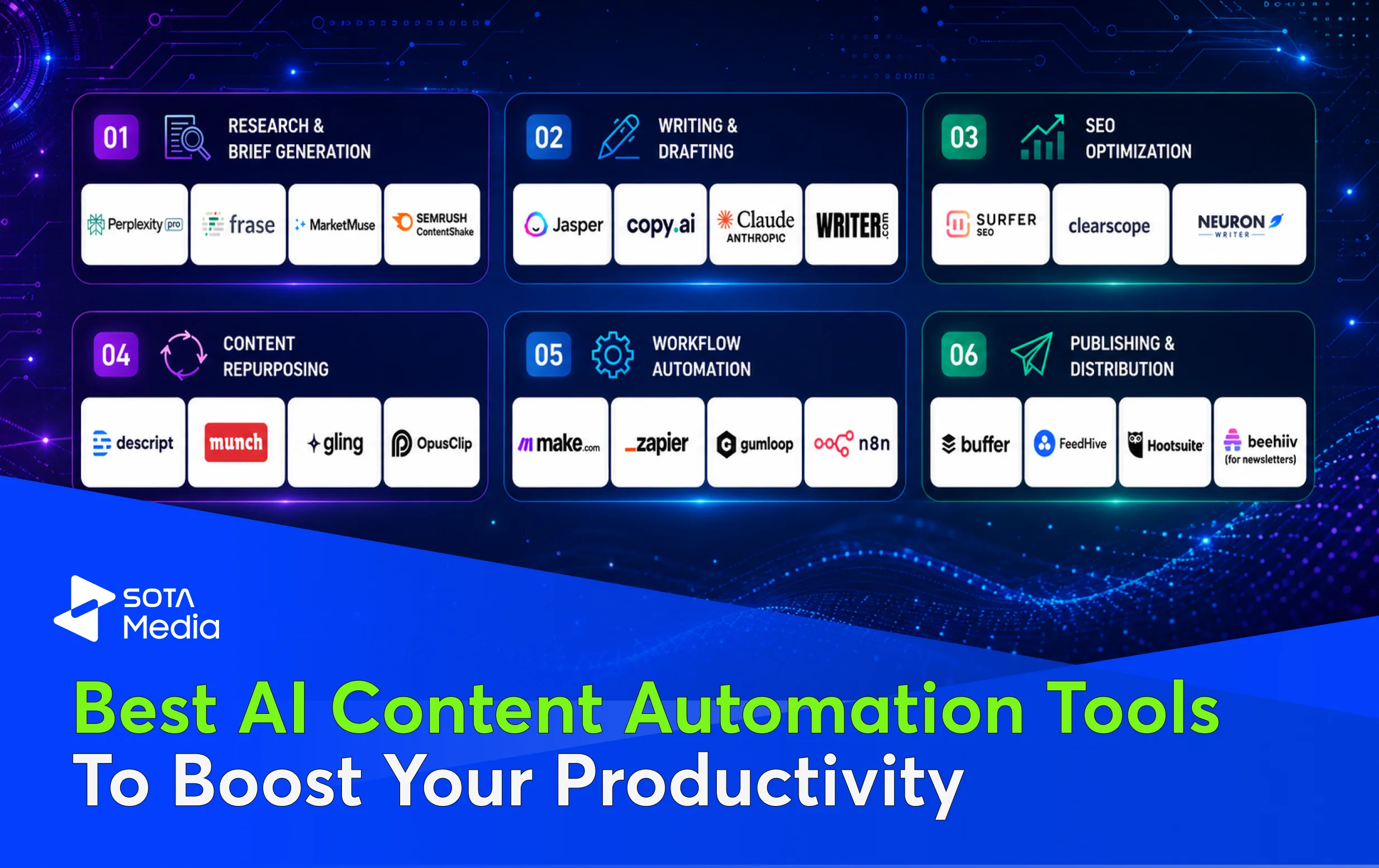
The best AI content automation tools in 2026
We have organized this by where in your workflow each tool actually works best, not alphabetically or by popularity.
Category 1: Research & Brief Generation
These tools do the work that takes 3 hours and produce nothing publishable on its own. They exist to compress research and turn it into a brief you can hand to a writer.
Perplexity

What it does: Real-time search with sources cited. You ask a question, it searches the web, pulls multiple sources, and gives you a summary with links.
Cost: $20/month Pro, or free tier with limits
When it works: Researching a trend you do not understand. Pulling data on a specific industry. Finding recent statistics for an intro.
When it does not work: It cannot know your customer better than you. If you are researching “what small agencies care about,” Perplexity finds articles. It does not know if those articles are right.
Real limitation: It hallucinates sources sometimes. Always verify claims before publishing. That is not automation. That is verification work you still have to do.
Frase
What it does: Content brief generation. You give it a keyword, Frase pulls top search results, analyzes them, and generates a brief with recommended structure, keywords, and what the top competitors are saying.
Cost: $14.99/month for starter tier
When it works: You already know what to write about. You want the brief generated instead of manually analyzing 10 competitor pages.
When it does not work: If you are not sure what angle to take, Frase recommends “write what competitors write.” That is not a competitive advantage. That is copying.
Trade-off: Frase is SEO-focused. It tells you what keywords matter. It does not tell you what your customer actually cares about. Those are not always the same.
MarketMuse

What it does: Content competitive analysis and gap identification. You give it a topic, it analyzes all ranking content, and tells you what is being missed.
Cost: $599/month (expensive for small teams)
When it works: Enterprise marketing teams or agencies that manage dozens of clients. The per-client cost gets reasonable.
When it does not work: Solopreneurs or small teams. The price is a dealbreaker for single-brand content.
What makes it different: MarketMuse finds gaps instead of just summarizing what exists. “Nobody is covering X angle on this topic.” That is useful if you want to differentiate. Most tools just tell you what to copy.
Semrush Content Shake
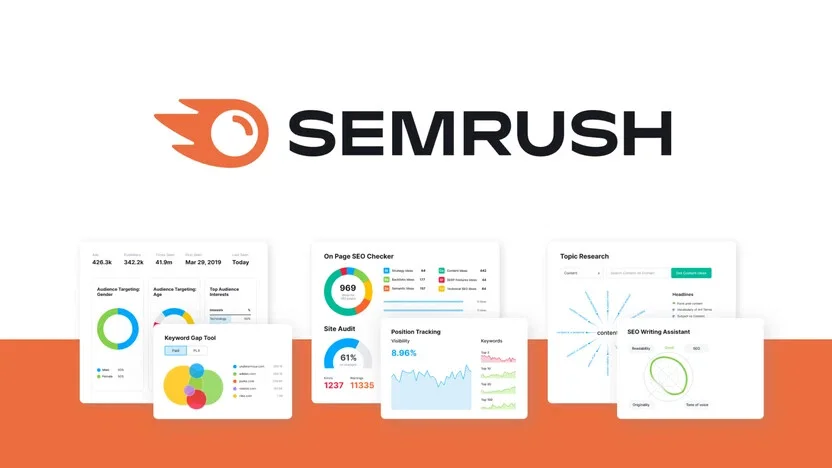
What it does: Brief generation from SEO data. Semrush pulls keyword research, competitor analysis, and trending topics, then generates brief + outline.
Cost: Included in Semrush Business plan ($399/month) or standalone at a lower tier
When it works: You already use Semrush for keyword research. The brief generation integrates with data you already have.
When it does not work: If you do not use Semrush, learning their platform to use this tool is time you are not saving.
Category 2: Writing & Drafting
These tools take your brief and produce a first draft. That first draft usually needs editing. The time savings come from “blank page to workable draft” being compressed from 2 hours to 20 minutes.
Jasper AI
What it does: Full-content generation. You give it a brief or outline, and Jasper generates long-form content. It has team collaboration, version history, and brand voice settings.
Cost: $125/month for unlimited generations
When it works: Solopreneurs or small teams that produce 15+ pieces per month and have brand voice locked down.
The real advantage: You can train Jasper on your brand voice (your existing blog posts, tone guide) and it starts mirroring that tone. That is not magic. It is just matching patterns in your training data. But it works.
Trade-off: Jasper’s training data ends at early 2024. If you need current events or recent research, you still need Perplexity to feed Jasper a current brief.
Copy.ai
What it does: Copywriting for short-form. Blog intros, email subject lines, social media copy, ad copy. Not full blog posts.
Cost: $49/month
When it works: You produce lots of short-form content (newsletters, social media, email campaigns). You want fast variations.
When it does not work: Long-form blog posts. Copy.ai is not built for 2,000-word pieces. It is built for snappy copy.
Real limitation: Output is generic without training. You feed it a brand voice guide or past examples to get on-brand copy. Without that, all outputs sound like Copy.ai defaults.
What it does: Advanced drafting. You can give Claude a detailed brief and get back nuanced, well-researched drafts. Claude can read PDFs, understand complex product specs, and produce output that does not feel templated.
Cost: Free tier (limited) or $20/month Claude Pro, or API pricing ($3–$15 per 1M tokens depending on model)
When it works: Complex writing that requires understanding. Product documentation. Deep analysis pieces. Anything that needs more than template-filling.
When it does not work: You need fast iterations or high volume. Claude is slower than Jasper because it thinks more. If you need 50 social posts this morning, use Copy.ai. If you need one great analysis piece, use Claude.
Why it is different: Claude is not optimized for volume. It is optimized for output quality. It also tells you when it does not have enough information. Jasper will generate something. Claude will say “I need [more info].”

What it does: Enterprise drafting with brand control. Organizations can control vocabulary, style, tone, and messaging across all outputs.
Cost: Enterprise pricing (typically $10K+/year for mid-market)
When it works: Large enterprises that need consistent brand voice across 50+ writers. The control and compliance tools justify the cost.
When it does not work: Small teams. Solo creators. You are paying for control you do not need.
Category 3: SEO Optimization
These tools take a draft and optimize it for search. They are not magic. They find keywords that are missing and suggest rewrites. A human still decides if the rewrite is right.

What it does: On-page optimization analysis. You give it a piece of content and a keyword, and Surfer compares your piece against top 10 results, scoring you on word count, structure, keyword usage, and readability. Then it suggests rewrites.
Cost: $99/month
When it works: You have a piece drafted and want to optimize for search without manually analyzing competitors.
When it does not work: It optimizes for ranking factors, not customer comprehension. Surfer might tell you to include a keyword 15 times. That kills readability. You still have to decide if the recommendation is right.
Real value: Surfer saves the 30 minutes you would spend in Google Sheets comparing your piece to top results.

What it does: Content optimization and brief generation. Similar to Surfer, but with more focus on semantic relationships between concepts.
Cost: $99/month
When it works: You want optimization and research data in one tool.
When it does not work: Clearscope has a smaller feature set than Surfer. If you need deep customization, Surfer has more options.
Trade-off: Clearscope is simpler to use. Surfer has more features. Pick based on what you need.

What it does: SEO optimization, content briefs, and outline generation. End-to-end workflow from research to optimization.
Cost: $59/month for early access tier
When it works: You want one tool that handles brief generation and optimization. You do not want to switch between Frase and Surfer.
When it does not work: It is relatively new. Feature maturity lags behind Surfer and Clearscope. If you need advanced customization, stick with specialists.
The advantage: Cheaper than Surfer + Frase combined. Decent workflow. Not best-in-class at either, but good enough for small teams.
Category 4: Content Repurposing
These tools take one piece (a blog post or video) and turn it into 10 other formats (social clips, newsletter snippets, emails, video scripts). This is pure time savings. No creativity required. Just distribution.
What it does: Video and audio editing from transcripts. Record a video, Descript transcribes it, you edit the transcript, and the video edits automatically. Can also repurpose video into clips, quotes, and audiogram.
Cost: $24/month
When it works: You produce video and want to turn one long video into 5 short clips without manually editing each one.
When it does not work: Descript assumes video input. If you are working with text only, use Munch or Opus instead.
Real advantage: Edit by transcript instead of timeline. That is genuinely faster than video editing.
Munch

What it does: Long-form video → short-form clips. Upload a YouTube video or blog post, Munch AI identifies the best moments and auto-generates clips for TikTok, Instagram Reels, YouTube Shorts.
Cost: $50/month for 50 clips/month
When it works: You produce long-form content and want distribution across short-form platforms without manual editing.
When it does not work: TikTok algorithm. Munch finds the right moments, but there is no guarantee they will perform. Munch identifies what is extractable, not what will go viral.
What it actually saves: The 2–3 hours you would spend watching your own video and marking clip boundaries.
Opus Clip

What it does: Long-form → short-form clips with captions and graphics. Similar to Munch, but includes captions and trending audio suggestions.
Cost: $9/month for 5 clips/month, $99/month for unlimited
When it works: Budget-conscious teams that want clip generation. Opus is cheaper than Munch and includes captions.
When it does not work: Customization. Opus does not let you fine-tune which moments become clips. Munch gives more control.
Trade-off: Opus is cheaper and includes captions. Munch gives more control. For most teams, Opus is sufficient.
Gling

What it does: Auto-editing for YouTubers. Removes silence, filler words, bad takes, background noise. Then generates short clips for other platforms.
Cost: $19/month for 25 hours of processing
When it works: YouTubers who record unscripted or have lots of raw footage. Saves hours of manual editing.
When it does not work: Scripted content where you have already edited tightly. The AI will find less to cut.
Who loves it: Podcast networks, YouTube channels, interview shows. Anything with raw footage.
Category 5: Workflow Automation
These tools connect your content tools together so output flows from one system to the next without manual hand-offs. If you use 5 different tools, this is how you make them work as one.
What it does: Low-code automation. Connect any app (Jasper, Surfer, WordPress, Slack, email) and build workflows like “When blog is published in WordPress, repurpose into social media drafts and send to Slack for review.”
Cost: Free tier (limited), $9–$99/month for production use
When it works: You use 3+ tools and want them to talk to each other without manual intervention.
When it does not work: You have only 1–2 tools. The setup time is not worth it.
Real value: One piece published to WordPress automatically feeds into Munch (clip generation), social scheduling (Buffer), and Slack (team notification). That is 10 minutes of manual work compressed to zero.
What it does: Same as Make, but simpler and more app connectors.
Cost: $19–$99/month
When it works: Standard workflows with popular apps. Zapier has 1000+ integrations.
When it does not work: Complex workflows. Zapier is simpler but less powerful than Make for advanced automation.
Why choose Zapier over Make: Better app library. Better UX for non-technical users. Make has more power but steeper learning curve.

What it does: AI workflow automation. Unlike Zapier, Gumloop builds workflows that include AI steps. “Use Claude to summarize the article, then post to Twitter, then email the summary.”
Cost: Free tier available, $50–$499/month for production
When it works: You want AI as a step in your workflow, not just connecting apps.
When it does not work: Simple integrations. Gumloop is overkill if you just need app-to-app connection.
Real example: Article published → Gumloop asks Claude to write 5 social variations → each gets posted to different platform → summary emailed to team. That is one workflow, no manual steps.
What it does: Self-hosted automation (or cloud hosted). Like Make, but you can run it on your own infrastructure.
Cost: Free if self-hosted, $0–$99/month for cloud, plus infrastructure costs
When it works: Enterprise teams with security requirements or custom integrations.
When it does not work: Small teams. The setup and maintenance overhead is not worth it.
Why it matters: Data privacy. If you cannot send content through Zapier or Make’s servers (regulations, contracts), n8n runs on your infrastructure.
Category 6: Publishing & Distribution
These tools schedule content to publish across multiple platforms and measure performance from one dashboard.

What it does: Social media scheduling. Write once, schedule to Twitter, LinkedIn, Instagram, Facebook, TikTok from one dashboard.
Cost: $5–$100/month depending on accounts and features
When it works: You have content ready and need to schedule across 3+ platforms. The time savings come from one publish interface instead of five.
When it does not work: Content creation. Buffer does not help you create. It only helps you distribute.
Real limitation: Buffer does not optimize scheduling time. You pick publish time. It does not tell you “this post will do better at 10am Tuesday based on your audience.”

What it does: Social media management with content ideas, scheduling, and analytics. Also includes AI-powered caption suggestions.
Cost: $99–$499/month
When it works: Agencies or teams managing multiple client accounts. FeedHive scales better than Buffer for large teams.
When it does not work: Solopreneurs. The price is too high for one brand.
What makes it different: FeedHive suggests content ideas based on industry trends. Buffer just schedules what you give it.
What it does: Social management, scheduling, analytics, and team collaboration.
Cost: $49–$739/month
When it works: Enterprise teams. Hootsuite has the most features and integrations of any platform.
When it does not work: Small teams. Overkill and expensive.
Honest take: Hootsuite is the default enterprise choice. Not because it is the best. Because it works with everything and does not break.
Beehiiv
What it does: Newsletter writing, sending, and analytics. Focused on email specifically, not social.
Cost: Free tier + $15–$49/month for paid tiers
When it works: You send a newsletter weekly and want write-and-send in one place with subscriber analytics.
When it does not work: If you already use HubSpot or Mailchimp for email. Do not add another tool.
Real advantage: Built for newsletter creators, not marketers trying to use email as one channel. It shows subscriber growth, engagement, and revenue metrics out of the box.
How to stack these tools into a real workflow (3 examples)
Picking individual tools is not the whole problem. You need them to work together. Here are three workflows we see work.
Workflow 1: Solo Creator (Blog + Social)
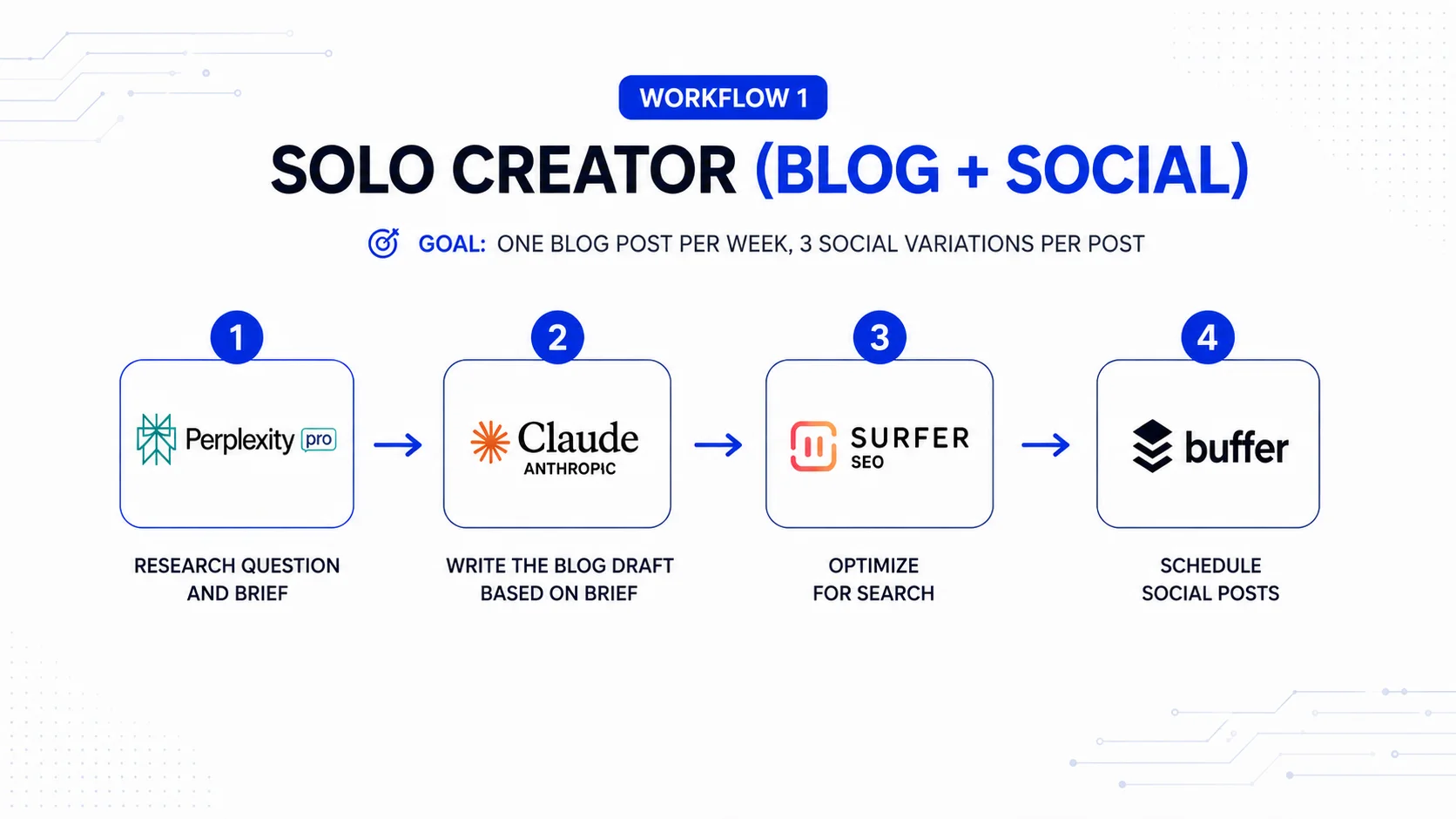
Goal: One blog post per week, 3 social variations per post
The stack:
- Perplexity Pro → research question and brief
- Claude → write the blog draft based on brief
- Surfer SEO → optimize for search
- Buffer → schedule social posts
Execution:
- Monday: Spend 1 hour in Perplexity researching topic, generate brief
- Monday–Tuesday: Give brief to Claude, get draft back
- Tuesday: Spend 30 min optimizing in Surfer, publish to WordPress
- Wednesday: Give final blog link to Claude, ask for “generate 3 short-form social versions,” paste into Buffer, schedule for next week
Cost: $20 (Perplexity) + $20 (Claude Pro) + $99 (Surfer) + $5 (Buffer) = $144/month
Time saved: ~6 hours/week (vs. manual research, writing, and social posting)
Cost per piece: $144 ÷ 4 blogs/month = $36/blog
Workflow 2: Small Team (Blog + Video + Social + Email)
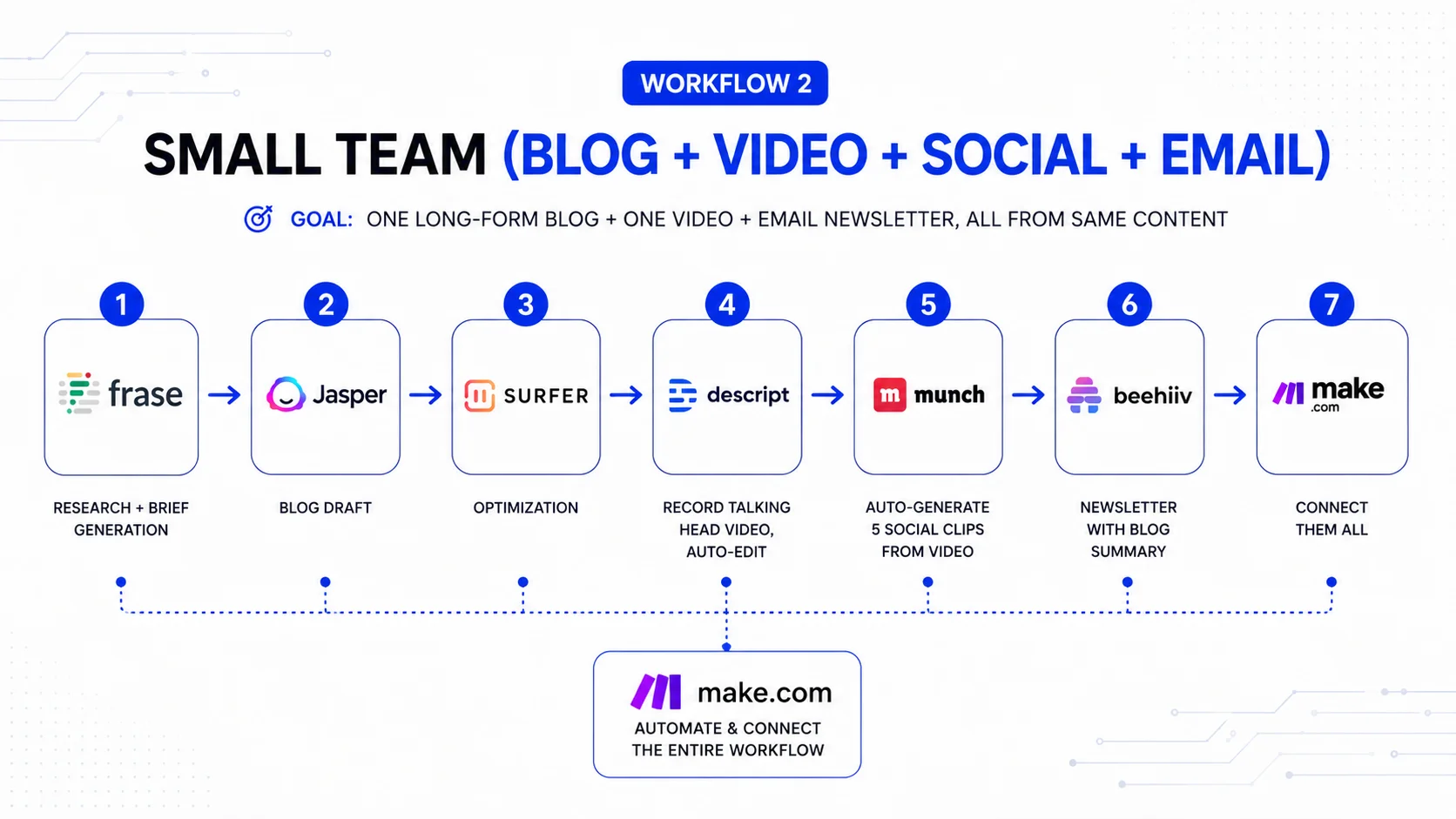
Goal: One long-form blog + one video + email newsletter, all from same content
The stack:
- Frase → research + brief generation
- Jasper → blog draft
- Surfer → optimization
- Descript → record talking head video, auto-edit
- Munch → auto-generate 5 social clips from video
- Beehiiv → newsletter with blog summary
- Make.com → connect them all
Execution (automated):
- Publish blog to WordPress
- Make automatically feeds blog to Munch, generates 5 clips
- Make sends social clips to Buffer for scheduling
- Make extracts key quote from blog, sends to Beehiiv draft
- Team edits Beehiiv draft, publishes
Cost: $125 (Jasper) + $99 (Surfer) + $14.99 (Frase) + $24 (Descript) + $50 (Munch) + $0 (Beehiiv free tier) + $9 (Make basic) = $322/month
Output: 1 blog + 1 video + 5 social clips + 1 email per week
Cost per piece: $322 ÷ 8 total pieces = $40/piece
Workflow 3: Agency (Multiple Clients)
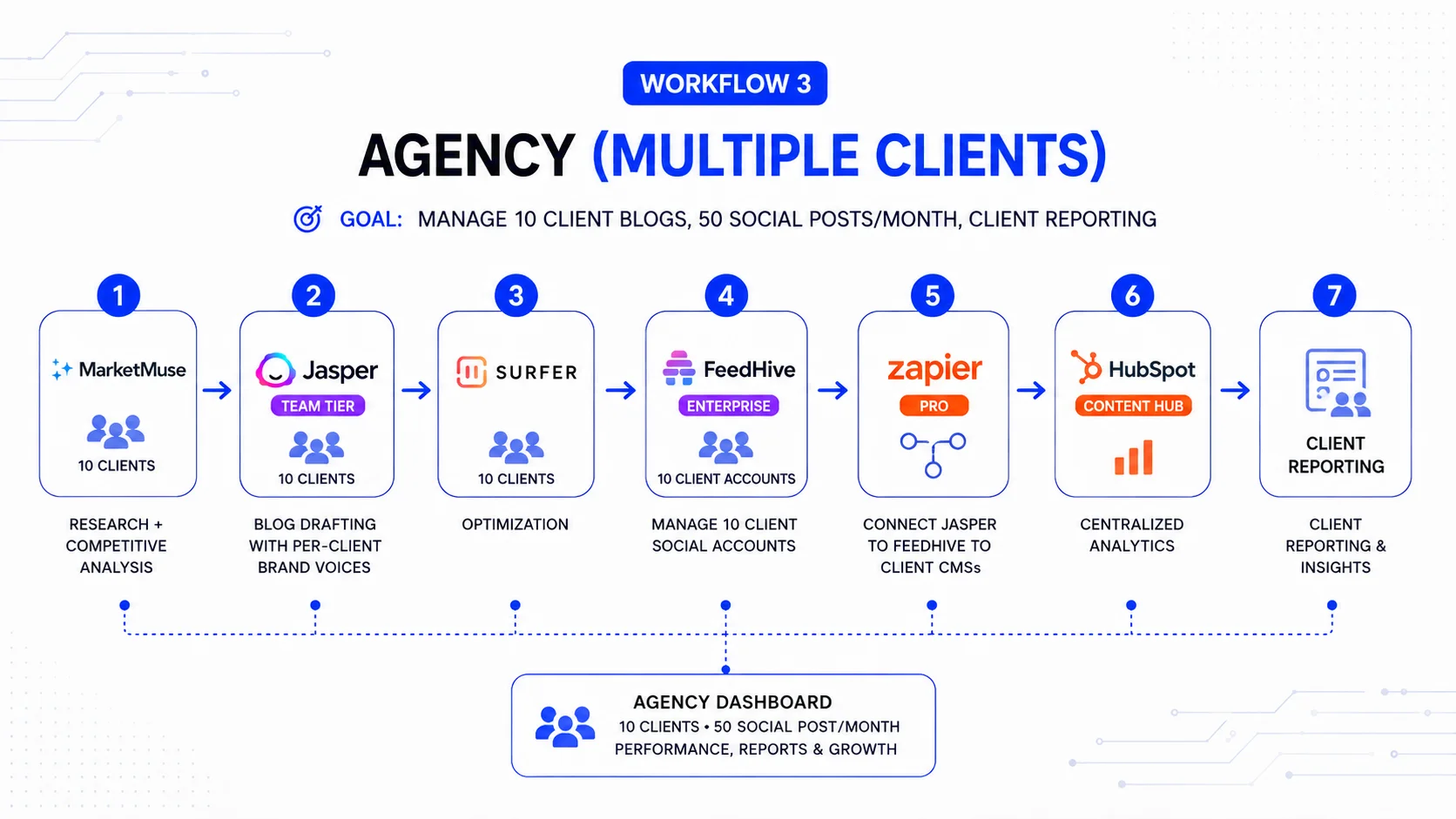
Goal: Manage 10 client blogs, 50 social posts/month, client reporting
The stack:
- MarketMuse (for all 10 clients) → research + competitive analysis
- Jasper (team tier) → blog drafting with per-client brand voices
- Surfer → optimization
- FeedHive (enterprise) → manage 10 client social accounts
- Zapier Pro → connect Jasper to FeedHive to client CMSs
- HubSpot (Content Hub) → centralized analytics
Execution (mostly automated):
- Brief generated from MarketMuse for each client
- Jasper produces draft (trained on each client’s voice)
- Draft approved in Zapier workflow (notification to client)
- Final piece pushed to WordPress + social scheduled via FeedHive
- HubSpot tracks all performance in one dashboard
Cost: $599 (MarketMuse) + $125 (Jasper team) + $99 (Surfer) + $499 (FeedHive) + $99 (Zapier Pro) + $90 (HubSpot basic) = $1,511/month
Output: ~50 pieces/month across 10 clients
Cost per piece: $1,511 ÷ 50 = $30/piece (agency bill-out rate covers this 3-4x over)
The biggest mistakes when automating content (Things we see teams do)
Mistake 1: Automating before you have brand voice documented
You set up Jasper, train it on three old blog posts, and it starts generating content that sounds halfway between your voice and the Jasper default voice. You end up with 50 pieces that do not sound like you.
Fix: Before using any drafting tool, write a brand voice guide:
- 3 examples of your best writing
- 1 example of writing you do not want to sound like
- Word list: words you use, words you avoid
- Tone: serious? casual? expert? approachable?
Feed that guide to Jasper. Then test. Generate 5 pieces. Do they sound like you or like Jasper?
Mistake 2: No human review step
AI generated a blog post claiming “X platform has 50 million users.” The platform actually has 5 million. The post published. Now you have credibility damage.
Fix: Always have human review. Not for typos (automation can catch those). For:
- Factual claims (is this number correct?)
- Brand fit (does this align with our positioning?)
- Customer relevance (did we miss what our customer actually cares about?)
Budget 30 minutes per piece for review. That is not optional.
Mistake 3: Optimizing for volume instead of quality signals
You set Surfer to “optimize for keyword density” and your best piece now has the keyword 22 times. Unreadable. But Surfer says it ranks high.
Ranking is not the goal. Ranking and being read is the goal.
Fix: Use optimization tools as suggestions, not rules. Surfer finds opportunities. You decide what to implement. That keyword recommendation? Maybe you only need it 8 times to rank and 22 times kills the piece.
Mistake 4: Using one tool for everything
You bought an “all-in-one” platform that does research, drafting, optimization, scheduling. It does all of them poorly. You abandon automation.
Fix: Specialists beat generalists. One best-in-class research tool, one best-in-class drafting tool, one best-in-class scheduling tool, connected by a workflow platform, will beat one mediocre all-in-one every time.
Mistake 5: Not measuring what automation actually saved
You spent $500/month on tools. Are they saving time? You don’t know because you didn’t measure.
Fix: Measure before and after:
- How long did a piece take without tools? (hours)
- How long does a piece take with tools? (hours)
- Monthly cost of tools ÷ monthly time saved = actual cost per hour
If you save 10 hours/month and pay $500/month, that is $50/hour. If you would have paid a freelancer $50/hour, tools break even. If you would pay freelancer $30/hour, tools are expensive. Measure and decide.
What SotaMedia does with content automation
We build content workflows for tech companies that need volume without losing voice. We typically:
- Audit your existing content to extract brand voice, patterns, and what actually drives engagement
- Design a workflow that uses specialists (best research tool for your category, best drafting for your tone, best optimization for your market)
- Connect the tools with Make or Zapier so publication triggers distribution, so drafting tools feed optimization tools, so nothing requires manual hand-offs
- Set up training and review so your team uses the tools consistently and maintains quality
- Measure and optimize the workflow. After month one, we know which tools are actually saving time and which are overhead.
Because we work across tech companies, we see what workflows work in different categories. B2B SaaS needs different stacking than Web3 needs. Different automation for healthcare vs. fintech. We have done this work enough times to know what actually works vs. what marketing hype says works. If you need content automation built for your team, let’s talk.