

AI Automation Workflow: 10 Easy Builds That Actually Work


Table of Contents
According to McKinsey’s 2025 State of AI report, 88% of organizations now use AI in at least one business function, and over two-thirds use it across multiple functions. But only 6% say they see measurable impact from it.
The gap is not a technology problem. Most teams have access to the same tools. The difference is whether those tools are wired into actual workflows that run without someone manually starting them every time.
This guide covers 10 AI automation workflows you can build today that actually work, across marketing, sales, content, and operations, using tools that are already widely available.
What Is an AI Automation Workflow?
An AI automation workflow is a connected sequence of steps where AI models handle specific tasks automatically, triggered by an event or a schedule, without requiring manual input for each step.
A simple example: when a lead fills out your contact form, the workflow pulls their LinkedIn profile, scores them against your ICP criteria, routes high-fit leads to a sales rep with a summary, and sends everyone else into a nurture sequence. That entire chain runs without anyone touching it.
The key difference between AI automation and basic automation (like a Zap that forwards an email) is that AI adds a judgment layer. It can read unstructured input, write a first draft, classify something ambiguous, or decide which of three options fits best. These are tasks that used to require a person.
Three components make up any AI automation workflow: a trigger (what starts it), one or more AI steps (where the work happens), and an output (where results land). Platforms like Make, n8n, and Zapier let you chain these together visually without writing code.
Why Build AI Automation Workflows in 2026?
The honest answer: labor costs are up, attention is limited, and the volume of work across marketing, sales, and operations keeps growing.
McKinsey’s data makes the picture clear: 88% of organizations are using AI somewhere. But what it does not explain is why so few see real impact. The answer, from teams who have worked through this, is that most organizations use AI as a point tool. Someone uses ChatGPT to write an email here; someone else uses it to summarize a meeting there. None of it compounds. None of it reduces actual working hours in a measurable way.
Workflows change that. When AI runs a complete process end-to-end, not just one step, the time savings are real and repeatable. A content repurposing workflow that takes a 2,000-word blog post and produces 8 social posts, a newsletter section, and a short-form video script in 4 minutes does not just save time once. It saves that time every time you publish.
The other reason to build now: the tools have matured. In 2023, stringing AI into a multi-step workflow required custom code. Today, Make and n8n have native OpenAI and Anthropic integrations. Most of these workflows take an afternoon to build.
10 AI Automation Workflows You Can Build Today
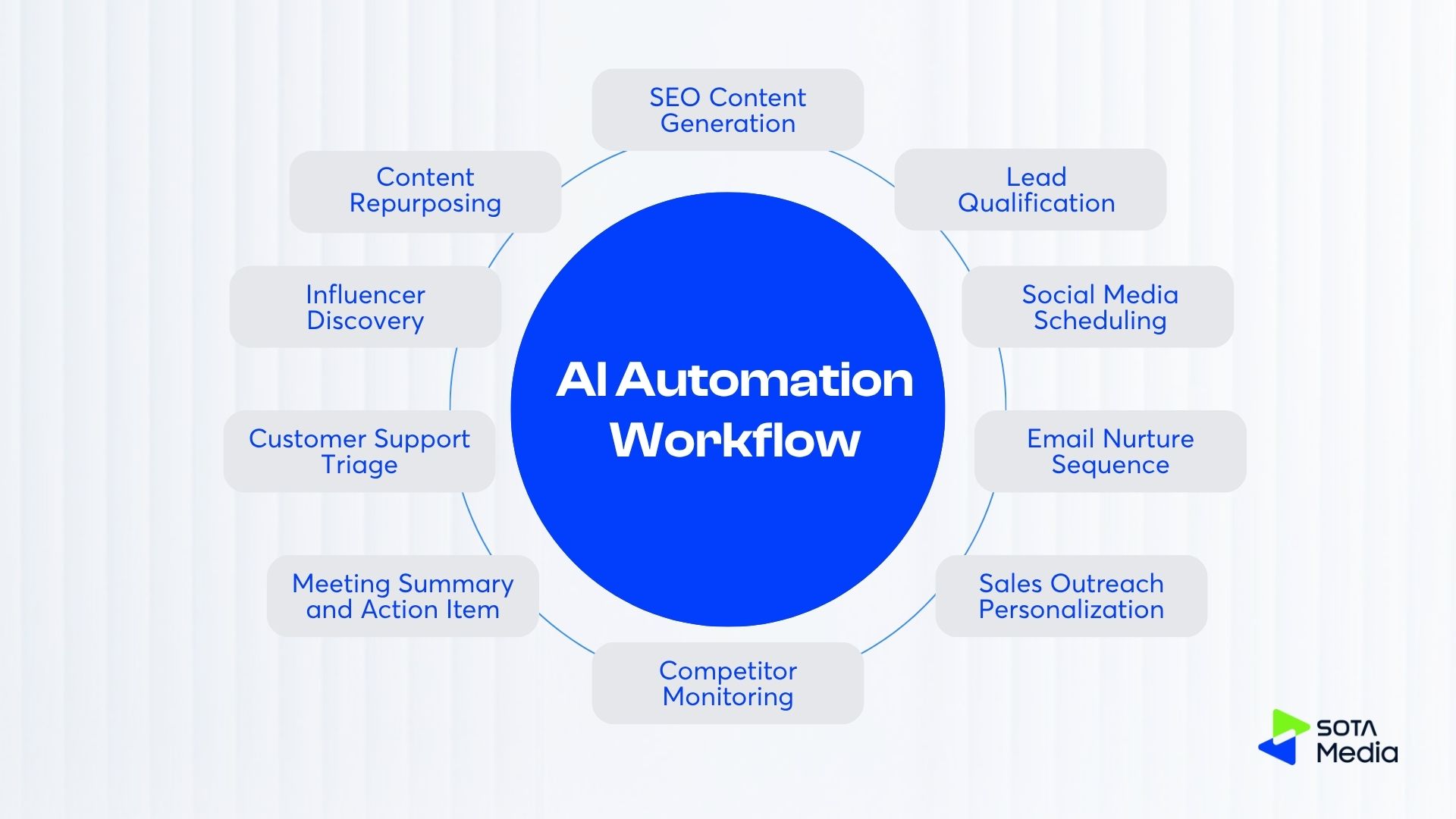
1. Content Repurposing Workflow
What it does: Takes one long-form piece of content (blog post, podcast transcript, or webinar recording) and automatically produces platform-specific versions for LinkedIn, X, Instagram, and your newsletter.
Tools: Make or n8n + OpenAI or Claude API + your content storage (Notion, Google Drive, or a CMS)
How it works: The workflow watches a folder or RSS feed for new content. When something new appears, it sends the full text to an AI model with separate prompts for each output format: a LinkedIn post optimized for professional tone, a shorter X post with a hook, and a newsletter intro paragraph. The outputs land in a Google Doc or directly in your scheduling tool.
The step most people skip: write your prompts once with examples of your brand voice. ‘Write a LinkedIn post’ produces generic output. ‘Write a LinkedIn post in the style of these three examples [paste examples] that produces something you would actually use.
Who it is for: Content teams publishing at least 2 pieces per week, solo marketers managing multiple channels.
2. Lead Qualification Workflow
What it does: When a new lead comes in from a form, LinkedIn message, or email, the workflow researches them, scores them against your ICP, and routes them accordingly.
Tools: Make or n8n + OpenAI + Apollo + your CRM
How it works: The trigger fires when a new lead hits your CRM or inbox. The workflow pulls their company website, LinkedIn profile, and publicly available firmographic data. It sends this to an AI model with your ICP criteria and asks for a fit score and a one-paragraph summary. High-fit leads go to a sales rep immediately. Everyone else enters a nurture sequence.
Vague ICP instructions produce inconsistent scores. Give the AI specifics: ‘Score this lead 1-10. Criteria: company has 50-500 employees, B2B SaaS or tech, marketing or growth role, based in SEA or ANZ.’
Who it is for: Sales teams handling 20 or more inbound leads per week and founder-led sales where time for research is limited.
3. Social Media Scheduling Workflow
What it does: Turns a topic or keyword into a week of scheduled social posts across multiple platforms.
Tools: Make or n8n + OpenAI + Buffer or Hootsuite + Google Sheets
How it works: You input a topic for the week. The workflow generates 5 to 7 posts per platform, with platform-appropriate formatting: hashtags for Instagram and no hashtags for LinkedIn, character limits respected. Posts go into a Google Sheet for review, and then after your approval, they are pushed directly to your scheduling tool.
One useful addition: have the AI pull 2 to 3 relevant news items or stats using a web search step before generating posts. Posts grounded in current information tend to get more engagement than purely AI-generated content, and adding this step takes 30 seconds.
Who it is for: Social media managers running multiple brand accounts and marketing teams where the bottleneck is content volume.
4. Email Nurture Sequence Workflow
What it does: Builds and sends personalized nurture emails to prospects based on their behavior and segment.
Tools: Make or n8n + OpenAI + HubSpot, Klaviyo, or ActiveCampaign
How it works: When a contact takes a specific action (downloads a resource, visits a pricing page more than twice, or opens 3 emails in a row), the workflow generates a follow-up email tailored to that action. The AI writes the email using context from the contact’s segment, the action they took, and your product positioning.
The difference between this and a standard drip sequence: the content changes based on what the person actually did, not just which list they are on. Someone who read your pricing page gets a different email than someone who downloaded your beginner guide. This takes about 2 hours to set up and meaningfully improves reply rates.
Who it is for: B2B companies with longer sales cycles, email marketers managing segmented lists.
5. Competitor Monitoring Workflow
What it does: Monitors competitor websites, LinkedIn pages, and job boards, then delivers a weekly digest of what changed.
Tools: Make or n8n + OpenAI + Firecrawl + Slack or email
How it works: The workflow runs on a schedule. Monday morning works well. It scrapes the competitor’s homepage, recent blog posts, and LinkedIn jobs page. It sends all of this to an AI model and asks three questions: what new products or features did they announce, what are they hiring for, and what changed in their messaging? The output goes to a Slack channel.
The job board part is underrated. Companies hiring machine learning engineers for a specific product area usually signal what they are building 6 to 9 months before they announce it. This takes about 3 hours to build and replaces manually checking 4 to 5 competitor sites every week.
Who it is for: Product marketers, founders staying close to the competitive space.
6. Meeting Summary and Action Item Workflow
What it does: Records a meeting, transcribes it, and delivers a structured summary with action items to all participants.
Tools: Otter.ai, or Fireflies + Zapier or Make + Slack or email
How it works: After a meeting ends, the transcription tool sends the transcript to a workflow. The AI model receives the transcript with a prompt asking for: a 3-sentence summary, a list of decisions made, and a list of action items with owner and deadline. The structured output goes to Slack and a shared Notion doc.
Most teams who use this say the value is not the summary itself. It is that people stop padding the next meeting with ‘what did we decide?’ and ‘who is handling that?’ questions. The record is already there.
Who it is for: Any team running more than 5 meetings per week.
7. Customer Support Triage Workflow
What it does: Classifies incoming support tickets, drafts responses for common issues, and routes complex ones to the right person.
Tools: Zendesk or Intercom + Make or Zapier + OpenAI
How it works: When a ticket arrives, the AI reads it and categorizes it (billing, technical, feature request, complaint) and assigns a priority score. For common issues (password reset, plan upgrade questions, basic how-to), it drafts a response using your knowledge base. A human reviews the draft before it is sent. Complex or escalated tickets go to a senior rep immediately.
The ROI here is straightforward to measure: track average first-response time before and after. Most teams see it drop from several hours to under 15 minutes, which directly affects customer satisfaction scores.
Who it is for: Support teams handling 50 or more tickets per week and companies where support is handled by a small team.
8. SEO Content Brief Generation Workflow
What it does: Takes a target keyword and produces a full content brief in minutes: SERP analysis, suggested H2s, key questions to answer, and a word count target.
Tools: Make or n8n + OpenAI + Ahrefs or Semrush API + Google Search API
How it works: Input a keyword. The workflow pulls SERP data for the top 10 ranking pages: their structure, headings, and average word count. It pulls People Also Ask questions and keyword volume and difficulty, then sends all of this to an AI model that writes the brief. Output: target keyword, search intent, recommended title, H2 structure, questions to answer, suggested word count, and competing articles to beat.
This used to take a content strategist 45 to 60 minutes per brief. The workflow does it in under 5. If you are producing more than 2 articles per week, this is the first workflow to build.
Who it is for: Content teams, managers, or SEO agencies managing content production for clients.
9. KOL and Influencer Discovery Workflow
What it does: Scans social platforms for relevant creators, scores them against your campaign criteria, and builds a shortlist automatically.
Tools: Make or n8n + OpenAI + social data API + Google Sheets
How it works: Define your criteria: niche, minimum follower count, audience location, and engagement rate floor. The workflow pulls profiles from the API, sends each one to an AI model for scoring against your criteria (including a check on whether their content style fits your brand) and outputs a scored, ranked sheet. You review the top 20 instead of scrolling through 300 profiles.
SotaMedia built a version of this for an online education client. KOC discovery time dropped from 2 to 3 days to a few hours, and the shortlisting quality was more consistent than when individual team members were doing it manually. The scoring criteria were applied the same way every time.
Who it is for: marketing teams running influencer campaigns and agencies managing KOL activation for clients.
10. Sales Outreach Personalization Workflow
What it does: Generates a personalized first-line opener for cold outreach based on each prospect’s recent activity.
Tools: Clay or Make + OpenAI + LinkedIn (via Phantombuster or similar) + your email tool
How it works: Pull a list of target prospects. For each one, the workflow scrapes their LinkedIn activity (recent posts, job changes, company news) and sends this to an AI model with a prompt asking for a 1 to 2 sentence personalized opener tied to something specific about them or their company. The output is a CSV where each row has the prospect’s name and their custom first line, ready to paste into your email sequence.
A test for whether this is working: if you could swap two people’s openers and both would still make sense, the personalization is not good enough. The AI prompt needs to be specific: ‘Write a 1-sentence opener referencing something specific from this person’s recent LinkedIn post or company news. Do not reference their job title.’
Who it is for: Sales teams are doing outbound, and SDRs are sending 50 or more cold emails per week.
How to Choose the Right AI Automation Workflow for Your Team
First, start with the task that takes the most manual time and has a clear, repeatable process. Ambiguous tasks (strategy, relationships, anything that requires judgment about context you have not documented) are not good candidates. Tasks that are high-volume, repetitive, and have a defined output format are ideal.
Second, pick workflows where the cost of a bad output is low. A draft email that needs editing is fine. An automated message sent to the wrong customer with the wrong information is not. Build human review steps into anything customer-facing until you trust the output quality.
Third, start with one workflow and run it for two weeks before building the next. Teams that try to automate five things at once usually end up with five half-working workflows. One fully working workflow that saves 3 hours per week is worth more than five that are each 60% reliable.
If you are not sure where to start, the meeting summary workflow is the easiest to implement and has near-universal value across teams. The content repurposing workflow has the highest ROI specifically for marketing teams.
How to Build an AI Automation Workflow
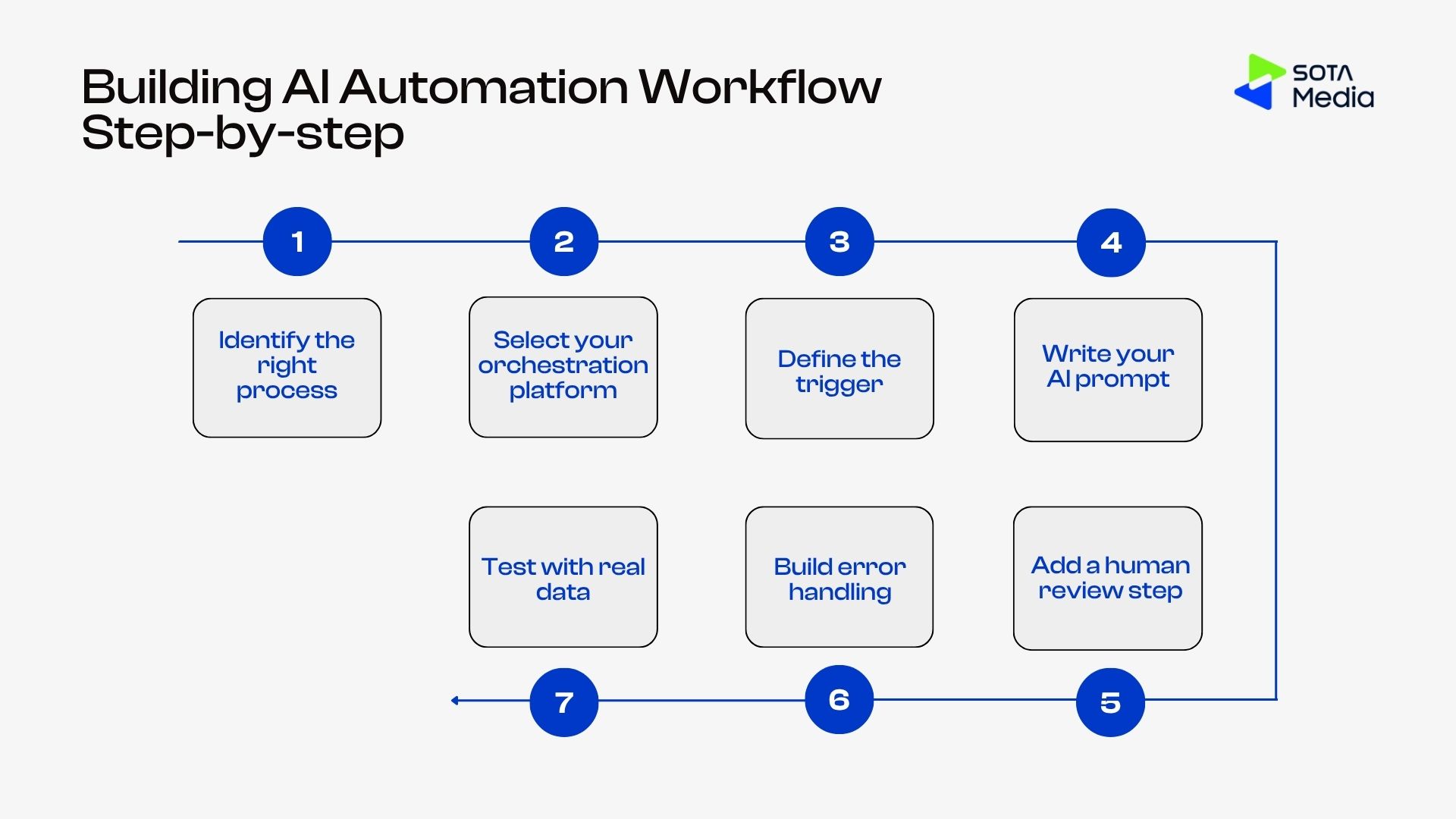
Step 1: Identify the right process: Choose a task that is high-volume, repeatable, and has a defined output format. Avoid ambiguous tasks that require contextual judgment you have not documented.
Step 2: Select your orchestration platform: Pick Make, n8n, or Zapier based on your technical comfort level. Make and n8n offer more flexibility for complex workflows; Zapier is simpler for straightforward integrations.
Step 3: Define the trigger: Set what starts the workflow, such as a form submission, a new row in a spreadsheet, a schedule, an email received, or a webhook from another tool.
Step 4: Write your AI prompt: Write a specific, detailed prompt that includes your desired output format, examples of good output, and any constraints. Test it manually in ChatGPT or Claude before building it into the workflow.
Step 5: Add a human review step: For any output that touches customers or prospects, add an approval step before the workflow sends or publishes anything. This can be a Slack message with approve/reject buttons in Make.
Step 6: Build error handling: Add a fallback route for when an AI step returns an unexpected format or an API times out. Route failures to a Slack notification or email so they do not go undetected.
Step 7:: Run the workflow on 5 to 10 real examples before activating it fully. Check that output quality is acceptable and that data passes correctly between steps.
Common Mistakes When Building AI Automation Workflows
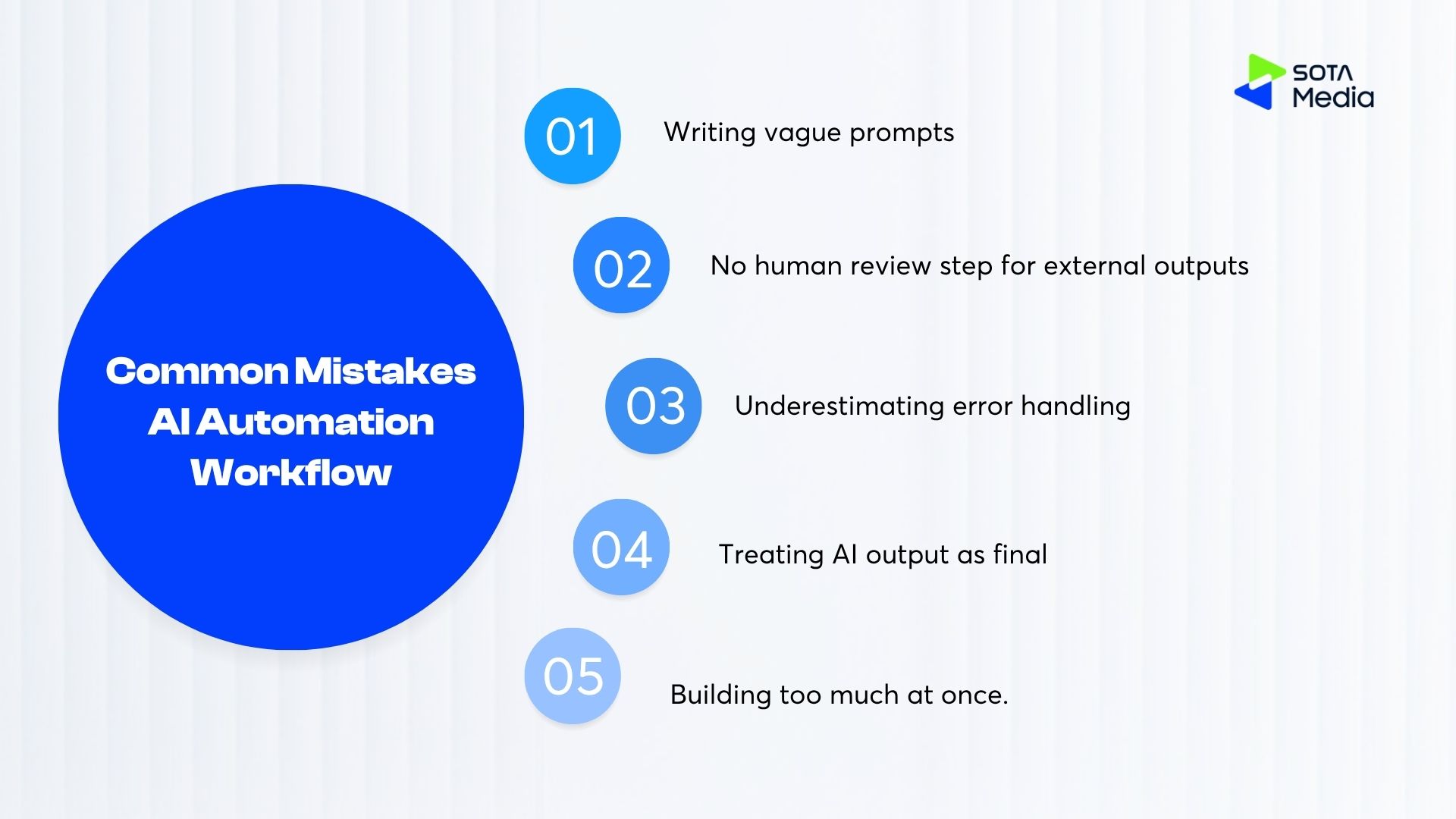
Writing vague prompts. The output quality of any AI workflow depends on prompt quality, and most prompts are too generic. ‘Write a LinkedIn post about this topic’ produces something usable about 30% of the time. ‘ Write a LinkedIn post in the first person, under 150 words, starting with a question or a counterintuitive claim, based on this content that produces something usable 80% of the time. Invest an hour upfront writing and testing your prompts before wiring them into the workflow.
No human review step for external outputs. Automated workflows that touch customers or prospects need a review step, at least in the first few weeks. Build one in from the start. Adding a wait-for-approval step in Make takes 10 minutes and saves you from sending something wrong at scale.
Underestimating error handling. What happens when the AI returns an unexpected format? When the API times out? When a source page changes its structure, Most first-time workflow builders discover this on a Monday morning when they cannot figure out why 40 leads did not get followed up. Map out what happens when each step fails before you ship.
Treating AI output as final. The output of an AI step is a starting point. Build workflows that put AI output in front of a human for review, editing, or approval. Teams that skip this step either end up doing damage control or lose trust in the workflow entirely and abandon it.
Building too much at once. The right scope for a first workflow is one trigger, two to three AI steps, and one output. Anything beyond that and you spend more time debugging than you save. Ship one workflow, measure the time savings, then decide what to build next.