

Bot Traffic vs Human Traffic: Why Bots Now Own the Internet


Table of Contents
Key Takeaways
- Bots now generate more than half (51%) of all internet traffic, surpassing human activity for the first time since 2013.
- Bad bots specifically account for 37% of all web traffic, up from 32% the year before.
- A new category of “good bots” has emerged: AI crawlers like GPTBot and ClaudeBot that feed large language models. These matter for GEO (Generative Engine Optimization), not just classic SEO.
- GA4 only filters known bots automatically. Sophisticated bots mimicking human behavior slip through undetected.
- Marketers reading GA4 without bot filtering are likely to overstate traffic, understate engagement quality, and misattribute conversion data.
What Is Bot Traffic?
Bot traffic is any visit to a website generated by an automated program (a “bot”) rather than a real human user. A bot can be as benign as Googlebot indexing your pages, or as destructive as a credential-stuffing script attempting thousands of logins per minute. The key distinction that matters for marketers is not whether traffic is automated, but whether it is useful or harmful to your measurements and business.
Good bot traffic includes:
- Search engine crawlers (Googlebot, Bingbot)
- AI training and retrieval crawlers (GPTBot, ClaudeBot, PerplexityBot)
- SEO auditing tools (Ahrefs, Semrush)
- Uptime monitoring tools
Bad bot traffic includes:
- Scrapers harvesting pricing or content data
- Click-fraud bots draining ad budgets
- Credential-stuffing bots attempting account takeovers
- Form-spam bots filling your CRM with fake leads
- DDoS amplification bots overwhelming server capacity
How Much Web Traffic Is Now Bots?
For the first time in a decade, automated traffic surpassed human activity in 2024, accounting for 51% of all web traffic. This figure comes from the 2025 Imperva Bad Bot Report, which analyzed billions of requests across its global network.
Bad bot activity rose for the sixth consecutive year, with malicious bots now making up 37% of all internet traffic, a substantial increase from 32% the year before.
The breakdown for 2024 looks approximately like this:
|
Traffic Type |
Share of All Web Traffic |
|
Human users |
~49% |
|
Good bots (search crawlers, monitors) |
~14% |
|
Bad bots (scrapers, fraud, DDoS) |
37% |
|
Total automated |
~51% |
This is not an abstract security problem. It directly affects every marketer who uses session data, conversion rates, or ad performance metrics to make budget decisions.
Good Bots vs Bad Bots: What’s the Difference?
Good bots have a declared identity (a known user-agent string), respect your robots.txt file, and serve a function that benefits site owners or end users. Bad bots are the opposite: they disguise themselves, ignore crawling rules, and consume resources without providing value.
|
Good Bots |
Bad Bots |
|
|
Identity |
Declared user-agent |
Fake or spoofed user-agent |
|
robots.txt |
Respected |
Often ignored |
|
Purpose |
Indexing, monitoring, AI training |
Scraping, fraud, DDoS |
|
Traffic source |
Known IP ranges |
Residential proxies, data centers |
|
Detection difficulty |
Low |
Medium to high |
|
Example |
Googlebot, GPTBot |
Scrapers, credential stuffers |
Why “good” vs “bad” is getting harder to judge:
AI crawlers sit in an uncomfortable middle ground. Cloudflare’s analysis found that Anthropic’s crawl-to-referral ratio reached as high as 500,000:1 and OpenAI’s peaked at 3,700:1, meaning AI platforms are aggressively crawling content without proportionally driving traffic back to source sites. They are not malicious in intent, but for site owners paying bandwidth costs, the distinction feels academic.
Why AI Crawlers Changed the Picture
This is where the bot traffic story shifts from a security topic to a marketing and GEO strategy topic.
Before 2023, the bot landscape was fairly binary: search engine crawlers (good) and everything else (mostly bad). The rise of large language models introduced a third category: AI training and retrieval crawlers that determine whether your content appears in AI-generated answers.
The key AI crawlers as of 2025:
|
Bot |
Company |
Purpose |
|
GPTBot |
OpenAI |
Model training + ChatGPT Search |
|
ChatGPT-User |
OpenAI |
Live retrieval when users query ChatGPT |
|
ClaudeBot |
Anthropic |
Model training |
|
PerplexityBot |
Perplexity |
Live retrieval for Perplexity answers |
|
Google-Extended |
|
Gemini training |
|
Meta-ExternalAgent |
Meta |
Llama training |
Between May 2024 and May 2025, GPTBot surged from 5% to 30% of AI crawler market share, a 305% increase in raw request volume. Another OpenAI crawler, ChatGPT-User, saw requests surge by 2,825%, reaching a 1.3% share.
AI search visits grew 42.8% year over year, climbing from 15.6 billion to 27.4 billion between Q1 2025 and Q1 2026. Blocking the crawlers that feed those engines removes a brand from an answer channel that now rivals classic search referrals.
What this means for your content strategy:
- Being crawled by GPTBot or PerplexityBot is the new equivalent of getting indexed by Google. It is a prerequisite for appearing in AI answers.
- There is a difference between training crawls (GPTBot, ClaudeBot) and retrieval crawls (ChatGPT-User, PerplexityBot). The second type fetches your page in real time when a user asks a question. Blocking it removes you from live AI answers.
- Cloudflare reported roughly 50 billion AI crawler requests per day across their network in 2025, about 1% of all web traffic routed through them, sharply up from 2024.
GEO implication: Content structured for LLM extraction (clear definitions, numbered steps, FAQ sections, cited statistics) performs better in AI-generated answers than content optimized purely for keyword density. This article is an example of that structure.
How to Detect and Filter Bot Traffic in Your Analytics
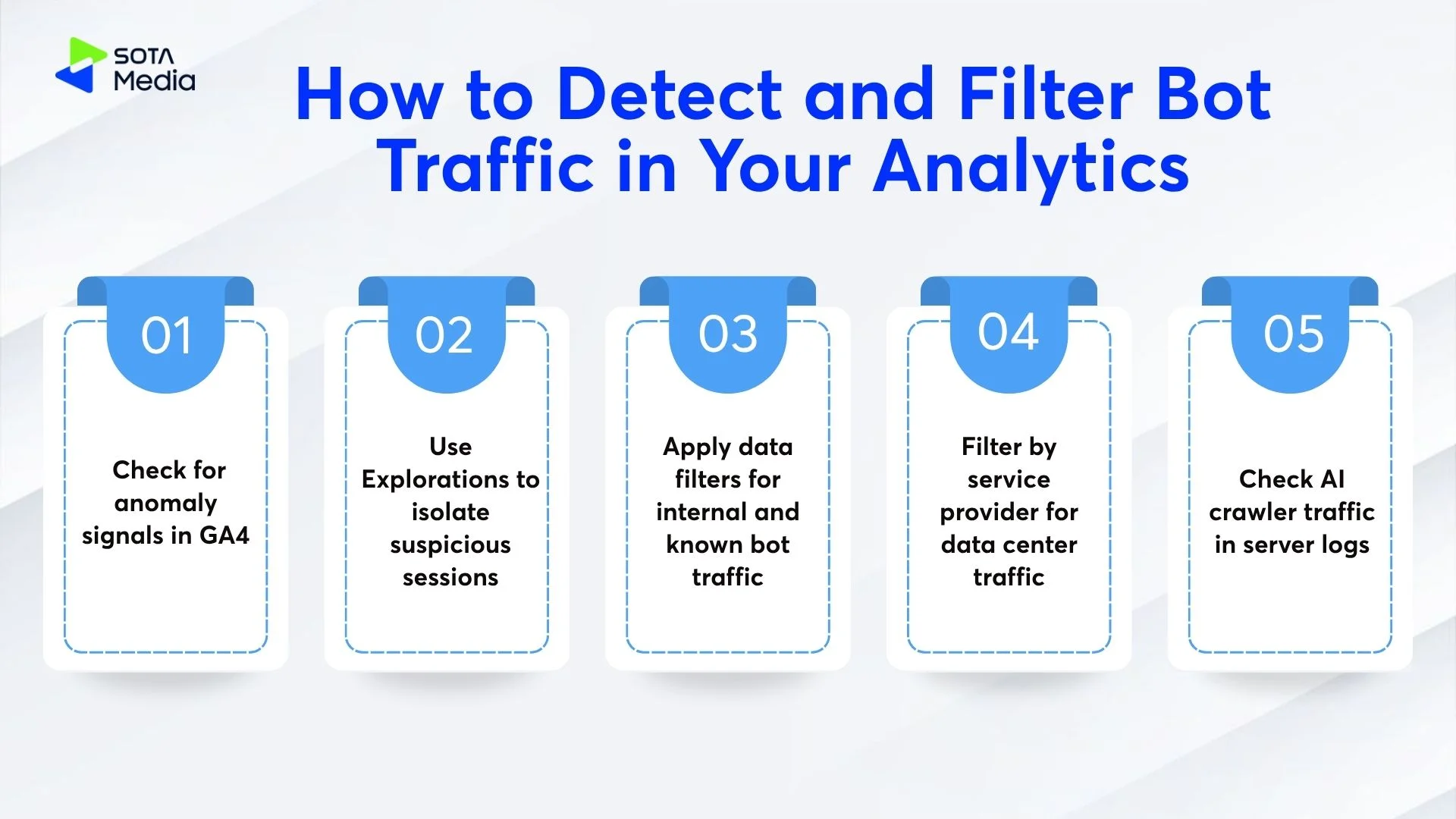
GA4 has automatic bot filtering, but it only removes known bots on the IAB/ABC International Spiders and Bots list. GA4 cannot stop unknown, evolving, or sophisticated bots that mimic human behavior. Detecting the rest requires a manual process.
Step 1: Check for anomaly signals in GA4
Look for these patterns in your Acquisition and Engagement reports:
- Sudden traffic spikes with no corresponding campaign or PR activity
- Sessions with 0-second engagement time at scale
- High event counts from a single city or country not in your target market
- “Total Users” count significantly higher than “Active Users” count
- Unusual referral domains (random strings, unfamiliar TLDs)
Step 2: Use Explorations to isolate suspicious sessions
GA4’s Exploration reports let you cross-reference dimensions. Build a free-form exploration with:
- Session source/medium
- Landing page
- City and country
- Device category and browser
A legitimate human session clusters around real browsers (Chrome, Safari, Firefox), reasonable geographic distribution, and at least some engagement time. Bot sessions stack unnaturally: same source, same landing page, same 0-second duration, across hundreds of rows.
Step 3: Apply data filters for internal and known bot traffic
Navigate to Admin > Data Streams > More Tagging Settings > Define Internal Traffic. Add IP ranges for your office, developers, and any QA environments. These create a filter you can toggle on or off in reporting.
Step 4: Filter by service provider for data center traffic
In Explorations, add “Service Provider” as a dimension. Use a regex filter targeting cloud infrastructure providers (AWS, Azure, Google Cloud, DigitalOcean, OVH, Linode) within the Service Provider dimension to isolate traffic from server farms that do not represent human customers.
Step 5: Check AI crawler traffic in server logs
GA4 does not capture crawler traffic at all, because bots do not fire the JavaScript tag. To see AI crawler volume, you need server access logs or a CDN-level dashboard. If you are on Cloudflare, the Bot Analytics panel shows verified bot traffic separately from unverified and human traffic.
Red flags that indicate significant bot contamination:
|
Signal |
What It Suggests |
|
Engagement rate below 10% on a content page |
High volume of bots with 0-second sessions |
|
Conversion rate sudden spike, no campaign change |
Form-spam or click-fraud bots |
|
Organic traffic up 40%+ overnight |
Scraper surge or referral spam |
|
Session duration average drops sharply |
New bot source entering the data |
What Bot Traffic Means for Marketers Measuring Real Performance
Inflated traffic numbers feel good until you try to act on them. When bots make up a meaningful percentage of your sessions, every downstream metric is wrong:
- Bounce rate gets artificially high (bots leave instantly)
- Pages per session drops (bots rarely navigate)
- Conversion rate gets distorted in both directions (spam form fills inflate conversions; bots dilute the denominator)
- Ad performance takes a direct financial hit: a 2025 analysis of over 4.15 billion clicks found an average fraud rate of 5.12%, with the worst networks showing more than 46.9% fraudulent traffic, and some companies losing up to 51.8% of their advertising budget to fake interactions.
How SotaMedia approaches this for clients:
At SotaMedia, traffic audits begin with separating measurement signal from noise before any campaign analysis. The standard process:
- Pull a 90-day server log sample and compare request volume against GA4 session counts
- Identify the gap (server requests minus GA4 sessions = non-JS traffic, mostly bots)
- Segment GA4 data by engagement time, filtering out 0-second sessions from any trend analysis
- Cross-reference paid traffic sources against click validity reports from the ad platform
- Set up anomaly alerts in GA4 for session volume spikes above 30% week-over-week
When you clean the data first, you get accurate baselines. Accurate baselines mean accurate attribution, which means budget decisions that actually reflect what real users are doing.
How to Read Your Traffic Data Honestly
The browser stat, the session count, the conversion rate: none of these numbers mean anything until you know what share of them reflects a real human who could have become a customer.
Start with one honest question: what percentage of your reported sessions have zero engagement time? In most B2B and content sites, that number sits between 15% and 35%. In extreme cases, companies have lost more than half their advertising budget to fake interactions. That is not an edge case. That is a systemic measurement problem.
The fix is not a single setting. It is a repeated audit process: check server logs vs GA4 session counts, segment by engagement time, filter known data center IP ranges, and document your methodology so you can run it the same way each quarter. When your traffic baseline is clean, every other metric (CPC efficiency, content ROI, channel attribution) improves automatically.
Get accurate traffic analysis for your site: SotaMedia’s analytics audit process isolates bot traffic from real user behavior so your campaigns are built on numbers that reflect actual demand. Contact SotaMedia to start with a traffic quality review.